Introduction
There is a popular saying, coined by data scientist Clive Humby in 2006, that data is the new oil, but what really brings value are the insights we can draw from that data and use for decision-making. This is especially true in prospect research, where the quality and timeliness of insights can have a significant impact on constituent relationships and donor acquisition.
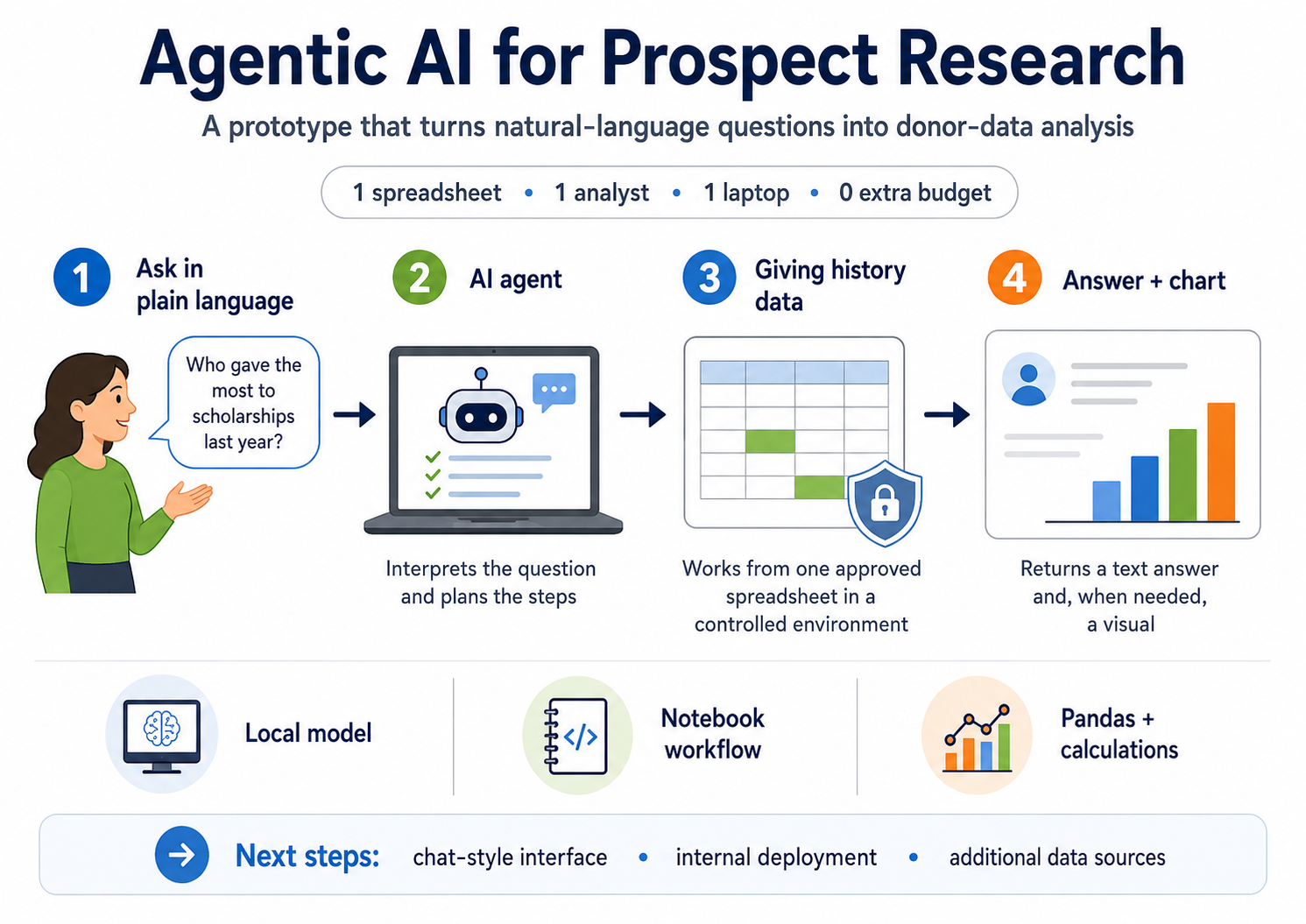
While CRMs, ERPs and other data storage and reporting systems allow us to view data in a more structured and “talking” way, it often still takes time to pull everything together and reconcile the numbers from several views to reach meaningful conclusions. The dream is to literally ask the system questions like “Who gave the most to scholarships last year?” “How much has this donor given in total?” “Can you show giving by college over the last five years?” – and get fast, precise answers. This is where AI could potentially shine. But is it feasible to build such a tool in a small prospect research shop with no extra budget and one or two analysts?
The prototype described here was built in the Advancement and Public Relations office at Eastern New Mexico University – a shop of a vice president of advancement, one research analyst, and four part-time gift officers. At the time, our advancement CRM was still being implemented, so much of our data still lived in spreadsheets, which made the need for quick, structured answers even more pressing.
This article describes the initial experience of prototyping an AI tool that takes natural-language questions as input and provides insights based on donor giving history listed in a single Excel spreadsheet. The goal is to show what the initial steps of a real AI implementation in prospect research might look like.
We also aimed to describe the general concept in plain, widely used language rather than technical jargon. If you’d like to discuss the technical side, feel free to reach out to us.
From Generative AI to Agentic AI
When it comes to AI, the most common questions from managers can be summarized as follows:
- “Is our data safe when we are using this?”
- “Can I trust AI to get it right?”
Dealing with sensitive data such as prospect contact information or wealth scores and potential AI “hallucinations” were key challenges in our case as well.
Both concerns can be addressed by using a so-called agentic AI approach. As the name suggests, such tools contain “agents” – prebuilt components that help transform questions (prompts) into useful results in a step-by-step way. In simple terms, while classical generative AI based on large language models (LLMs) directly generates answers (and may sometimes produce hallucinations), agentic AI works differently. It asks the LLM to translate the question from natural language into a more structured form (you can think of this as simple code or instructions) and to select the tools that will solve the problem. In our specific case, to get insight from a data table, we need something that can read tables, perform calculations and create charts when needed.
It is important to mention that LLMs are still used inside AI agents, so hallucinations can still occur, but usually to a much lesser extent than when the LLM is asked to “do everything” and generate answers on its own.
Another important advantage in our setup is that the model’s “brain” (the LLM) can be downloaded to your work laptop and completely run internally, without sending any data outside the organization. This is crucial for keeping information safe and secure. On-premise LLMs are usually more limited than the very large online-accessible models running in huge server rooms, but they are still powerful enough to handle many complex tasks efficiently.
Overall, an AI agent can be thought of as a set of building blocks tied together to solve a specific group of tasks.
Experiment Design
Our inputs were as follows: one central giving history spreadsheet, one analyst with mid-level Python knowledge (using a local PyCharm environment), one average work laptop and zero extra budget. All told, building the prototype took roughly 24 hours of work, including testing with the team and minor refinements. The goal was to create a way for researchers and advancement leaders to “talk” to the data directly, without having to learn programming or advanced Excel features. The key requirements were: (1) getting results with no factual mistakes and (2) avoiding sending sensitive data to external AI services.
The prototype agent has three main parts, described here in non-technical terms:
-
The data. A standard giving history spreadsheet with one row per gift and a small set of fields used in prospect research. Behind the scenes, the file is loaded into a secure analysis environment, but to the user it is simply “the giving history the agent can see.”
-
The brain. An open-source language model downloaded to the analyst’s laptop. We used GPT-OSS-20B, a completely free LLM. “20B” stands for roughly 20 billion parameters – the connections in the model’s “brain,” the adjustable values where everything it has learned is stored. The most advanced LLMs have far more, but this size is “smart enough” for our purposes and the analyst’s laptop can handle it. Despite that size, the model is designed so that only a small slice of its 20 billion parameters is active for any single question, which is part of why an ordinary laptop – one with around 16 GB of memory – can run it efficiently. The model’s job is to understand the question and sketch out the steps needed to answer it (including tools selection).
-
The coach. A small Python script that sends the model a short description of the data and the question, asks for simple analysis steps, runs those steps through the tools in a controlled environment and then shows the results. A great feature is that if something fails – maybe a typo in a column name – the agent looks at the error, asks the model to fix it and tries again.
“It’s Alive!”
In the prototype, a user runs the tool in a local Python notebook and types prompts in plain language, such as: “Give me the name of the donor who gave the most in total and how much they gave,” or “Plot a bar chart of total giving by college for the last fiscal year.” As you may notice, some answers the user expects are just text or numbers, while others also require visuals like charts.
Figure 1 shows a made-up example of such an exchange – a question in plain English, and the text-and-chart answer the agent returns.
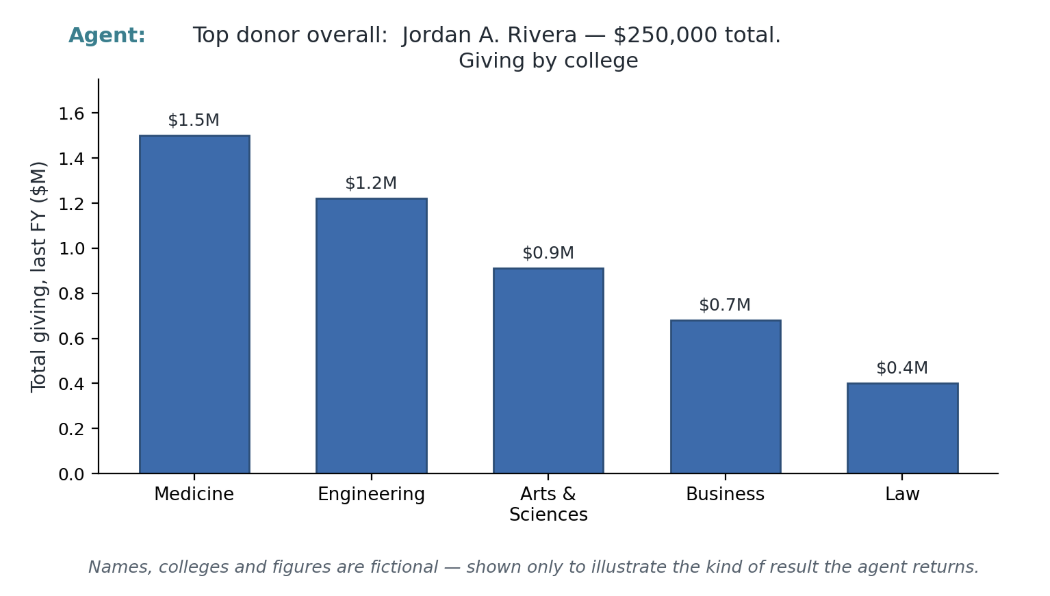
The agent reads the prompt, looks at the structure of the giving data using the connected LLM, runs the steps to answer the question and returns a clear result. When appropriate, it also creates a chart that can be saved for a briefing or presentation. As building blocks (tools), we used a Python library that works with tables (called Pandas), along with standard Python math and logic functions for calculations and data filtering. At the end of the day, from the user’s point of view, it feels like a conversation with the data rather than a series of spreadsheet commands.
A natural question is how far we can trust these answers. Because the agent writes and runs code rather than working the numbers out “in its head,” the calculations themselves are exact; the main remaining risk is the model misreading a question or choosing the wrong column – something we can catch, because the steps it takes are shown alongside the result. As a check, we manually compared the agent’s answers against the same figures worked out by hand, and they matched. This is reassuring rather than conclusive: even a low error rate matters in donor work, so wider, more systematic testing is part of our plan.
To provide additional security measures, we designed the Python environment so that it cannot open any new files other than the giving history spreadsheet, cannot connect to the internet and cannot access other systems. These guardrails help keep the agent focused and reduce the risk of unwanted behavior.
What’s Next: Smarter Agents and More Data
The prototype we created can provide precise answers to the types of questions listed above for our data within a couple of minutes. Some strong limitations remain, though, which suggest several next steps for us:
-
Make the interface more user-friendly. The Python notebook that currently handles the tool is not ideal for non-technical users. It contains all the code as well as the results. We are exploring free and safe “chat-like” user interfaces that will help advancement professionals, including gift officers, work with this tool more comfortably.
-
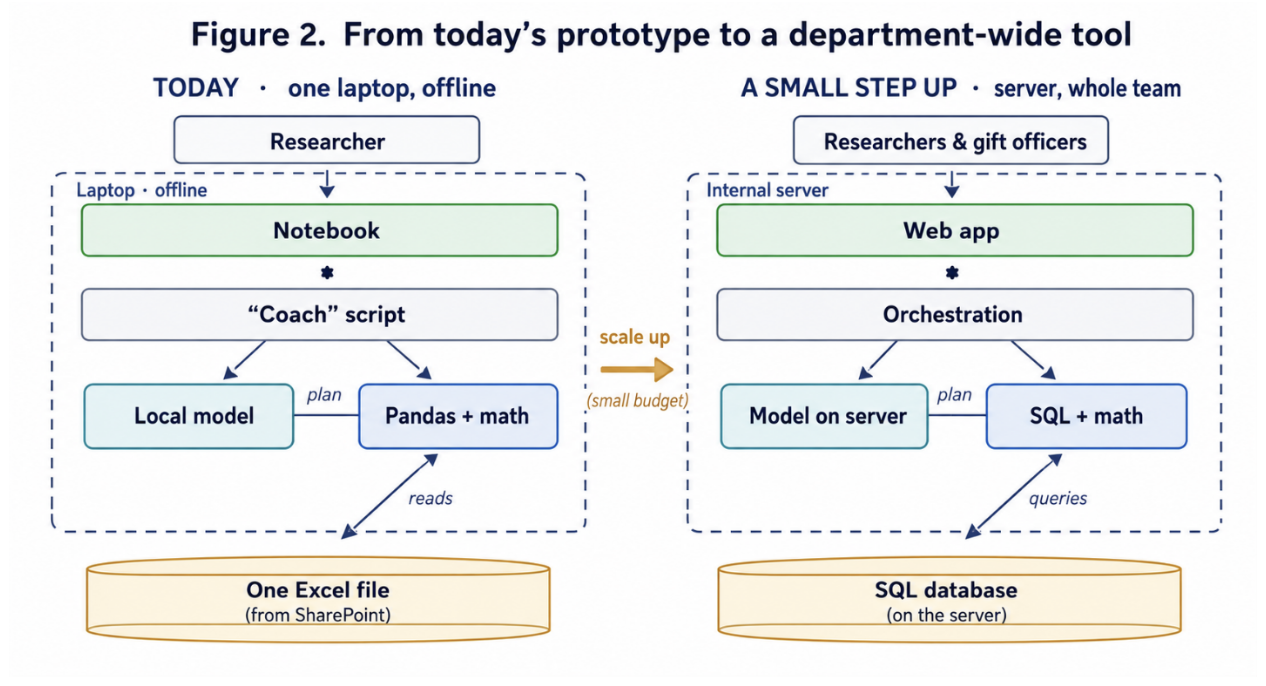
Move from one laptop to the internal environment. Right now, the model “lives” on the analyst’s laptop and cannot be used on other machines. We need to do some data engineering to arrange the building blocks in the internal IT environment so that the model is accessible to other users within the corporate network.
-
Extend beyond a single data source and simple chains. The model is currently limited to one data source and one straightforward chain of actions (even though it can check itself to some extent). We are actively exploring extended toolsets for agents. For example, there are pre-built blocks that transform prompts into SQL queries that can work with relational data models instead of single tables or even retrieve data from CRM systems via specific interfaces. We are also looking into graph-based AI agent structures that allow more complex and flexible behavior – using several agents in one system, handling conversation history and finding optimal ways to solve problems instead of just reacting to prompts.
-
Ground answers in real sources (RAG). Where an agent is mostly about doing – choosing tools and running steps to compute an answer – retrieval-augmented generation, or RAG, is about grounding: before answering, the system first looks up the most relevant records and bases its reply on what it actually found, rather than on the model’s memory. A richer version, GraphRAG, also maps how people and gifts are connected, so the tool can follow relationships – say, a donor’s ties to a board member – instead of matching isolated facts. This matters because so much of prospect research lives in narrative and relationships, not just in one table of numbers, and because tying every answer back to a real source is one of the strongest ways to keep the system honest.
What This Means for Prospect Research
This prototype is modest. It does not replace the other tools we have, and it still requires human oversight and judgment. Because it is a hand-built prototype running on a mid-range machine, it is not fast in absolute terms: a typical question – say, identifying the largest donor under a given set of conditions – takes the agent about a minute to work through, which feels slow next to today’s polished commercial chatbots. The relevant comparison, though, is not the chatbot but the alternative it replaces: reconciling the same answer by hand across several spreadsheets can take up to an hour and pull staff away from higher-value work. But it shows what is possible when AI agents are applied to prospect research: faster answers to routine questions and more time for researchers to focus on strategy and insight. It also offers a practical starting point and learning path toward more complex AI solutions. Early feedback from the team has been encouraging, and the clearest signal is the demand to move the tool off a single laptop and make it available across the department. A priority for us is to formalize that feedback loop – learning which questions and features deliver the most value in daily work, and which need improvement – so that the next round of effort goes where it counts.
Figure 2 sets the prototype and a possible next step side by side. On the left is the tool exactly as it was built today: everything on one laptop, working offline from a single spreadsheet on the team’s SharePoint. On the right is a modest, small-budget step up – the same design moved onto an internal server, with a proper database in place of the lone spreadsheet and a simple web app in place of the notebook, so the whole team can use it. The shape of the system barely changes; what grows is the number of people it can serve.
With careful attention to information security and a clear problem to solve, even a small advancement shop can experiment with AI agents in a way that is practical, ethical and directly tied to the day-to-day work of understanding its constituents.

Nikolai Shchelkov
Former Constituent Research Analyst, Eastern New Mexico University, Advancement and Public Relations
Nikolai Shchelkov, MSIS, MBA, is a former Constituent Research Analyst at Eastern New Mexico University, Advancement and Public Relations, with more than a decade in business intelligence and applied analytics (Power BI, SQL, Python, and machine learning). He focuses on making advanced data and AI tools practical and accessible for non-technical advancement professionals, especially in smaller shops. He introduced the "Digital Skills Gap Fillers" concept, a framework for conscious, low-cost AI adoption.